Should laptops be plugged in all the time?
March 25, 2025
Traditional vs Solar Laptop Batteries: Industry Trends 2024
April 7, 2025Battery bulging is a common but dangerous problem during the use of laptops. As a professional laptop battery supplier, the LaptopBatteryNet team often receives inquiries about battery bulging, where the laptop keyboard area suddenly bulges and the touchpad becomes uneven.
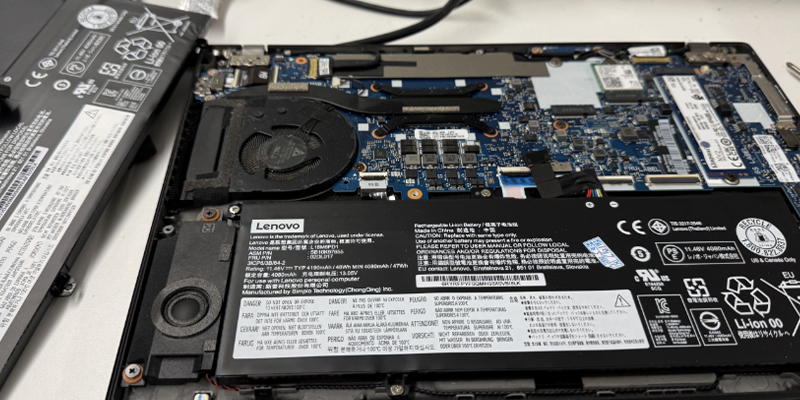
After disassembling the machine for inspection, it was discovered that the battery was bulging. This situation is actually not uncommon, but many people do not understand its dangers and the correct way to deal with it. Today, I will combine professional knowledge and practical experience to fully analyze the problem of laptop battery bulging for everyone.

Analysis of battery bulging
Battery bulging is called “battery bloating” in professional terms. It is a gas accumulation phenomenon caused by the imbalance of chemical reactions inside lithium-ion batteries. According to industry reports I have consulted, about 23% of laptop battery failures are related to bulging. Battery bulging is a gradual process, and its obviousness depends on the space limitations inside the laptop.
For ultra-thin notebooks (such as MacBook Air or XPS 13), due to the extremely limited internal space, even a slight bulge will immediately cause the shell to deform; while for thicker business notebooks (such as ThinkPad T series), the bulge may not be noticed until it is quite serious. From the initial small bulge to the final lifting of the touchpad, this process may only take a few weeks.
Why does the battery bulge? It can be roughly classified into the following reasons
1. Overcharging and discharging: the biggest enemy of battery health.
Laptop batteries are usually lithium-ion batteries, and the maximum voltage of this type of battery will decrease with overcharging. Overcharging will cause the deposition of battery electrolyte, which will block the electrodes, increase the resistance of the battery and reduce its voltage. Long-term overcharging will not only reduce the battery capacity, but may even cause the battery to deform or explode. Overdischarging is also a problem that cannot be ignored. During the use of the notebook, overdischarging will cause the battery voltage to drop abnormally, which may cause the device’s power display to be inaccurate, resulting in frequent charging and accelerated decline in battery life.
2. High temperature environment: an invisible killer that accelerates battery aging.
Using a notebook in a high temperature environment for a long time, especially when the temperature exceeds 60°C, will greatly shorten the battery life. High temperature will accelerate the chemical reaction inside the battery, causing the battery material to degrade, and even cause leakage, explosion and other dangers. Overheated batteries not only affect the performance of the device, but may also affect the stability and safety of the entire system. To avoid overheating of the battery, try to avoid exposing the laptop to high temperatures for a long time, especially when charging. It is best to place the device in a well-ventilated place.
3. Service life and battery degradation: Natural aging. Batteries are not permanent devices.
As the service life increases, the performance of lithium-ion batteries will gradually decline. Generally speaking, the life of a laptop battery is about 2 years, or after 500-600 charge and discharge cycles, the battery capacity and service time will decrease significantly. As the battery ages, the battery discharge platform will change, and the battery voltage will drop faster, resulting in a significant reduction in the battery life of the laptop.
4. Manufacturing defects: Hidden dangers of inferior batteries.
Some inferior batteries may have defects in the production process. These defects often lead to unstable battery performance, which in turn causes problems such as bulging. The discharge platform and stability of the battery are closely related to the manufacturing process. Therefore, high-quality batteries are more stable in long-term use and extend their service life.
How to prevent battery bulging?
Avoid overcharging: Try not to charge the battery to 100% when charging, and don’t wait until the battery is completely exhausted. It is ideal to keep the battery level between 20% and 80%.
Control the working environment temperature: Make sure the laptop is kept at a suitable temperature and avoid working in high temperatures for a long time. You can use a radiator or place the device in a stable and ventilated place to help dissipate heat.
Check the battery health status regularly: Check the battery health status regularly, especially when the battery is used for a long time. If you find that the battery is obviously swollen or the device usage time is drastically reduced, you should replace the battery as soon as possible.
Choose high-quality batteries: Try to choose batteries and chargers from well-known brands, which can ensure the quality of the battery and the stability of the charging process, and reduce the risk of failure.